The Randomly According to Intensity Distribution option generates ray directions based on a set of weighting factors in polar and azimuthal coordinates such that more rays are generated in the directions of large weighting factors. This ray direction specification is the default for sources created from IES files.
This feature can be accessed by selecting Randomly according to intensity distribution as the ray direction type on the Positions/Directions tab of a detailed source dialog box.
By right clicking in the spreadsheet area the options "Interpolate from source FGD file" and "Replace With Data From a File" are available.
Interpolate from FGD file Intensity data that has previously been calculated by FRED and saved to a *.fgd file can be used as the intensity data for generating ray directions. This can be useful, for example, when the source is described over a full hemisphere but only a portion of that space is desired to be used for ray generation. In such a scenario, the procedure would look like the following:
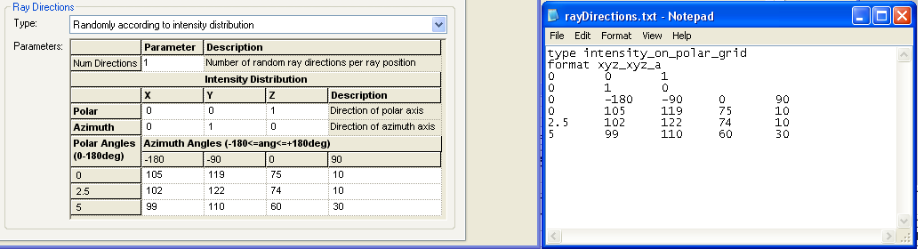
Replace With Data From a File A properly formatted text file can also be used to load intensity data into the ray directions specification. The image below shows a properly formatted text file and the resulting specification as it appears in the dialog.
Two header lines are required at the beginning of the text file:
type intensity_on_polar_grid format xyz_xyz_a
The third and fourth lines in the file are x,y,z vector components which indicate the directions of the polar and azimuthal axes, respectively. In the example file below, the polar axis is given by vector (0,0,1) and the azimuthal axis is given by vector (0,1,0).
The fifth line of the file consists of a placeholder 0 value followed by the azimuthal angles to which the data correspond. In this case, the azimuthal angles are -180, -90, 0, and 90 degrees.
The remaining rows consist of a polar angle value followed by intensity values at each spherical-polar coordinate. In this example the polar angles are 0, 2.5 and 5 degrees.
Ray Directions - Focus to / from two astigmatic focii Ray Directions - Astigmatic Gaussian beam Ray Directions - Focus to / from a point Ray Directions - Multiple source angles (plane waves) Ray Directions - Multiple source positions Ray Directions - Random directions into an angular range Ray Directions - Random directions into a sphere Ray Directions - Single direction (plane wave) Ray Directions - Directions to hexagonal grid points in angle space Ray Directions - M Squared Laser Beam
|
||||||||||||||||||||||||||||||||||||||||||||||||||||||||||||