|
Control
|
Inputs / Description
|
Defaults
|
|
Logical Parent
|
Read-only. Specifies the source's parent node on the tree.
|
Optical Sources
|
|
Name
|
Name of the source as it will appear on the tree view.
|
Lambertian Plane N
|
|
Description
|
Description string that will be visible on the tree view.
|
|
|
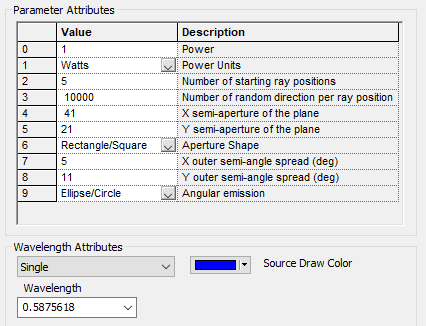
Parameter Attributes
|
|
0
|
Total power emitted by the source.
|
1.0
|
|
1
|
Physical units of the source power, specified as either Watts or Lumens. When Lumens are selected, the source wavelength attributes is forced to use the Random according to spectrum option.
|
Watts
|
|
2
|
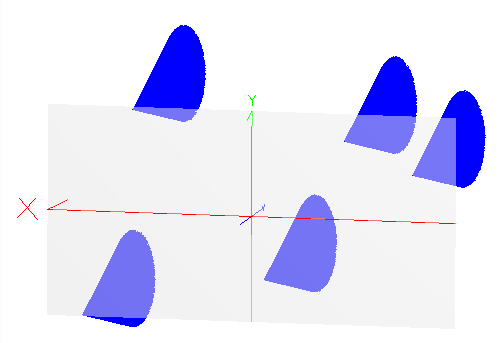
Specifies the number of random position samples within the source aperture from which rays will emit into the specified angular range.
|
42
|
|
3
|
Specifies the number of rays emitting from each random position within the aperture (parameter 2). The ray directions are randomly selected to sample the specified angular emission range.
|
1
|
|
4
|
Semi-aperture of the source in the X-axis.
|
0.5
|
|
5
|
Semi-aperture of the source in the Y-axis.
|
0.5
|
|
6
|
Shape of the source aperture. Options are Rectangle/Square or Ellipse/Circle.
|
Ellipse/Circle
|
|
7
|
X semi-angle of the cone of rays emitting from each point in the source aperture. Units are degrees.
|
90
|
|
8
|
Y semi-angle of the cone of rays emitting from each point in the source aperture. Units are degrees.
|
90
|
|
9
|
Shape of the angular emission cone leaving each point in the source aperture. Options are Rectangle/Square or Ellipse/Circle.
|
Ellipse/Circle
|
|
Wavelength Attributes
|
|
Single, List or Random according to spectrum
|
In the following descriptions, N is the number of ray positions in the source aperture (parameter 2) and M is the number of rays emitting from each point (parameter 3).
When the Single wavelength option is selected, N*M random rays will be generated at the specified wavelength.
When the List wavelength option is selected, N*M random rays will be generated at each of the active wavelengths with non-zero weights specified in the wavelength list.
When the Random according to spectrum option is selected, N*M random rays will be generated and each ray will have a unique wavelength whose value is selected by using the designated spectrum as a probability distribution.
|
Single at the default wavelength
|
|
Source Draw Color
|
If the Single or Random according to spectrum wavelength option is selected, this setting controls the ray position and trajectory draw colors.
If the List wavelength option is selected, this setting only controls the ray position draw color. Ray trajectory draw color is controlled by the color specifications in the wavelength List for each wavelength.
|
|
|
Polarization
|
|
Polarization
|
If checked, polarization data for the rays is maintained and stored.
|
Unchecked
|
|
Handedness
|
Sets the handedness of the polarization state (relevant for non-linear polarization states). If the ray is propagating towards you, the electric field vector rotates in a clockwise direction for Right handedness and counter-clockwise for Left handedness.
Note that for linear polarization, the application of Left or Right handedness is arbitrary. The user may find that the UI display switches handedness depending on the angle of the linear polarization state entered, but this will have no impact on the resulting representation of the linear state.
|
Right
|
|
Ellipticity
|
Sets the ellipticity of the polarization state, 0 represents linear polarization and 1 represents circular.
|
0
|
|
Angle
|
Sets the angle of the polarization relative to the X axis.
|
90
|
|
|
|
OK
|
Accept settings and close dialog box.
|
|
|
Cancel
|
Discard settings and close dialog box.
|
|
|
Apply
|
Accept settings and keep dialog box open.
|
|
|
Help
|
Access this Help page.
|
|
.png)