Materials can be created in FRED using sampled, catalog, formula or user-defined script definitions. Additionally, a utility exists to plot the refractive index of any material(s) versus wavelength.
Materials can be created in the following ways: •Menu > Create > New Material •Ctrl + Alt + T •Toolbar button:
Materials can be edited in the following ways: •Expand the Materials folder in the object tree and double click on a material of interest. •Expand the Materials folder in the object tree, right mouse click on a defined material and select "Edit/View Material" from the list menu. •From the Materials tab of a surface dialog, select a material in the list and click the "Edit/View" button.
A Sampled Material is defined by real and imaginary index values at specific wavelengths. Tabulated data can be read into this glass type.
A Model material is based upon a real index and the Abbe number defined at the sodium d-line.
An axial/radial GRIN material is defined by polynomial series in both radial and axial directions. Radial terms are even order only while the axial terms are both even and odd orders.
The Luneberg GRIN is defined by a radially varying refractive index according to the following equation (r0 is the radial normalization length):
The Maxwell GRIN is defined by a radially varying refractive index. The index is a quadratic function of radial distance from the axis.
The SELFOC GRIN is defined by a radially varying refractive index. The index is expressed by even order polynomial terms in the radial direction using the following equation:
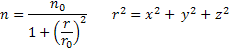
The Spherical GRIN is defined by a radially varying refractive index in three dimensions using the following equation:
Script Gradient Index Material The scripted material is a user-defined material whose refractive index real and imaginary parts are defined by arbitrary but continuous functions of x, y and z. The refractive index value must be positive greater than zero.
In FRED, coatings and materials store information about the last evaluation that was made. For coatings, this would be the R and T components for a ray with a given wavelength, position, direction, etc. For materials, this would be the real and imaginary indices for a ray with a given wavelength, position, direction, etc. The advantage of storing this information is that if the current incoming ray has the same properties as the last ray, there is no need to re-evaluate the coating or material properties and the raytrace can proceed much faster.
In the case of the scripted material, this implementation can potentially cause problems. For example, suppose the rays incident on the scripted material all have the same general properties (position, direction, wavelength). The first ray will trigger a successful evaluation of the material, but the subsequent rays, having the same properties as the first, would not trigger a new evaluation of the material. If the scripted material contained any elements of randomness (via a random number generator, for example), only the first ray in the queue would reflect this random modification. The rays following it would be modified in the same manner as the first ray.
When multi-threaded raytracing is used, rays on the same thread will exhibit the behavior described above.
At the start of a new raytrace, all materials are flagged as requiring a new evaluation for the first ray that is encountered.
It is strongly recommended that the script make no modifications to other nodes in the FRED document.
If a change is made to the document during the raytrace by way of the scripted entity, the state of the document as seen by each individual thread of the raytrace will be inconsistently defined and the results of the raytrace may not be valid.
A Sampled Birefringent material defines the ordinary/extraordinary indices for a specific orientation of the crystal axes. This material can also be used to define a gyrotropic material.
The Custom Glass material is a flexible definition whose primary function is to represent the materials added to the FRED document using the Custom Materials catalog, which contains a variety of materials defined according to wavelength-index tabulated data or dispersion equations. If a user has added a material from the Custom Materials catalog, this material will be defined on the object tree as a Custom Glass type with the corresponding dispersion equation information or tabulated data. If the user is defining a tabulated material within FRED (i.e. not adding from the Custom Material catalog), it is recommended that the Sampled Material type is used rather than the Custom Glass type as this allows use of the associated scripting commands.
The catalog glass types use the proprietary formula for each vendor.
The Formula glass offers common functional forms for specifying dispersive refractive indices.
The refractive index of any material or combination of materials can be plotted. Select a material (or multiple materials) in the Materials folder of the object tree, right mouse click and choose "Plot" from the list menu. A dialog will open allowing the user to select specific plot parameters.
Shown below is a plot of refractive index for Schott materials F5 and K7
|
|||||||||||||||||||||||||||||||||||||||||||||||||||||||||||||||||||||||||||||||||||||||





.png)