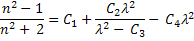
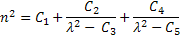
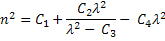
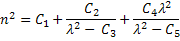
This feature allows materials nodes to be added to the Materials folder on the object tree using definitions from vendor catalogs. The following vendor catalogs are available:
This feature can be accessed in the following ways: •Right mouse click on the Materials folder in the object tree and select "Add Glass Catalog Material" from the list menu.
Only the Custom Glass catalog can be modified by the user. The CustomGlass.dat file can be found in the directory <FRED install dir>\Resources\Glass Catalogs\Custom and can be modified using a simple text editor such as Notepad. Materials added to this data file will be available in FRED using the Custom catalog in the Add Glass Catalog Material dialog. The header of the CustomGlass.dat file shows the required syntax for adding custom materials using one of the following formats:
Wavelength-Index Pairs Wavelength (um) nreal nimag
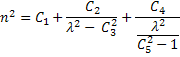
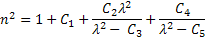
Sellmeier 1
Sellmeier 2
Sellmeier 3
Sellmeier 4
Sellmeier 5
Cauchy
Dispersion 1
Dispersion 2
Dispersion 3
Dispersion 4
Dispersion 5
Dispersion 6
Dispersion 7
Dispersion 8
Dispersion 9
Additionally, the internal transmission of a custom catalog material can be specified by appending tabulated transmission data to the material specification immediately following the definition of the material dispersion. The format for specifying the tabulated transmission data is the following:
! Internal Transmission on|off <ref thickness> <thickness scale factor to millimeters> ! <wavelen> <transmittance> ! wavelength in units of microns ! <wavelen> <transmittance> ! ... ! ... ! <blank line> ! must have at least one blank line
For example, SUPRAX has the following dispersion and internal transmission definition in the Custom Material catalog:
SUPRAX Suprax8488 Suprax_8488 Suprax-8488 Borosilicate glass Wavelength range: 0.3-1.0 um Source: Auer Lighting GmbH http://www.auer-lighting.com Wavelength-Index 0.001 365.01,1.4998 404.66,1.4944 435.83,1.4911 479.99,1.4874 486.13,1.4870 546.07,1.4836 587.56,1.4818 589.29,1.4817 643.85,1.4799 656.27,1.4796 706.52,1.4783 768.20,1.4771 852.11,1.4759 1013.98,1.4743 Internal Transmission off 10.0 1.0 0.3,0.04105 0.31,0.24451 0.32,0.52729 0.33,0.7412 0.34,0.87024 0.35,0.93115 0.36,0.96268 0.365,0.97018 0.37,0.97533 0.377,0.96515 0.378,0.9602 0.38,0.9629 0.385,0.97365 0.39,0.97991 0.395,0.98462 0.4,0.98555 0.41,0.98216 0.42,0.97965 0.43,0.97836 0.44,0.97862 0.45,0.97999 0.46,0.98236 0.47,0.98455 0.48,0.98618 0.49,0.98843 0.5,0.98824 0.51,0.98956 0.52,0.99009 0.53,0.99061 0.54,0.99029 0.55,0.99228 0.56,0.99278 0.57,0.99153 0.58,0.99092 0.59,0.99062 0.6,0.99007 0.65,0.9872 0.7,0.98331 0.75,0.97344 0.8,0.96353 0.85,0.953 0.9,0.94577 0.95,0.93881 1.0,0.9337
When a file is imported, if FRED cannot find a matching glass in the existing catalogs, a warning message will be printed to the output window and in the name of the material. Note that for Zemax imports, the glass catalog files will be searched by FRED during import if they are located in the same directory as the *.zmx file being imported.
A material can be applied to a surface via drag and drop onto that surface. Additionally, if a material node is drag and dropped onto a high level node construct (ex. subassembly, custom element, element boolean, etc.), that material property is inherited by all descendants of that node.
Each of the materials catalogs display the materials data differently. The different catalogs can be chosen by selecting an option from the Material Catalog drop down menu. In addition to displaying the values of Nd and Vd, some catalogs will display equivalent glasses from the other catalogs (i.e. Schott equivalent).
The glass list for all of the catalogs can be sorted according to Name(s), Nd, and Vd by left mouse clicking on the appropriate column header. The default order for the list is alphabetical by vendor name. If a column is numerical, the materials will be ordered by increasing or decreasing numerical values.
|
||||||||||||||||||||||||||||||||||||||||||||||||||||||