An Illuminance analysis gives results in Luminous Flux / Area. When all source units are specified (i.e. Watts or Lumens), the Illuminance calculation allows output in LUX (lm/m2), Phot (lm/cm2), Foot Candles (lm/ft2), Lumens/SysLengthUnit2 (lm/area), or Arbitrary (specify response spectrum). If not all source units are known, then the Illuminance calculation only allows output as Arbitrary (not all source power units are known). The Illuminance analysis should be used in place of the Irradiance analysis when Photometric considerations are required or when a user defined detector response is needed. This analysis can be applied to both incoherent and coherent sources, though it is not possible to set the ray wavelength generation method to "Random according to spectrum" when using a coherent source.
This command can be accessed in the following ways: •Menu > Analyses > Illuminance •Toolbar button:
In its basic operation (no detector response), the Illuminance calculation will only report the photometric units of Lux, Phot, Foot Candles or Arbitrary/SysLengthUnit2 when the source units are known (i.e. Watts or Lumens). If the source units are not known the Illuminance calculation will still proceed by integrating the source spectral distribution with the photopic response curve and multiplying by the scale factor, but the units are not guaranteed to be Lux, Phot or Foot Candles. Therefore, when the source has Unspecified units the only available option in the Illuminance calculation will be "Arbitrary (not all source power units are known)". These units can be interpreted as arbitrary photometric units.
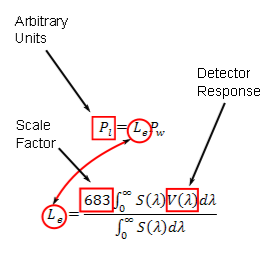
When the source units are specified (i.e. Watts or Lumens), the Illuminance calculation allows a user specified detector response function to be used rather than the standard photopic response curve and luminous efficacy value. In terms of the conversion to photometric units, the detector response function has the following application:
In this case we are not necessarily integrating with the photopic response curve or setting the appropriate scaling factor and so the resulting units are not necessarily photometric units. The end units are therefore arbitrary but not guaranteed to be arbitrary photometric.
It is therefore possible to recover photometric units in an Illuminance calculation by two methods: 1) Perform an Illuminance calculation using any of the photometric unit options. 2) Perform an Illuminance calculation using the a photopic response curve as the Detector Response and a scale factor of 683.
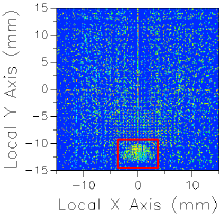
Image Artifact Diagnostic Tool If a raytrace has been performed using the Advanced Raytrace option with ray paths enabled, contributing raypath information for a particular region of interest can be reported directly from the chart view for an incoherent spatial analysis or analyses using a Directional Analysis Entity. This feature can be executed by holding down the ALT keyboard button while using the mouse to select a region of the main chart view (turn of "perspective view" using the right mouse button menu option). This procedure is outlined in the following example:
The image artifact diagnostic tool will print the following information to the output window: •Analysis surface used •Selected region x-min, x-max, y-min and y-max •Path number, path power and ray count for each contributing ray path (up to the first 30 paths, sorted by power) •Remaining path count and total power for paths not listed in the output window
IlluminanceToFileAS Function (script command) IlluminanceToARN Function (script command)
|
||||||||||||||||||||||||||||||||||||||||||||||||||||||||||||||||||||||||||