This utility allows points in a segmented curve definition to be generated automatically using the Generate Points utility, loading data from a file or digitizing a curve.
On the Segmented Curve definition dialog, right mouse click in the points spreadsheet area and select either "Generate Points...", "Replace with Data from a File", or "Digitize ... Data ... From Image" from the list menu.
The table below summarizes the controls for the "Generate Points" utility.
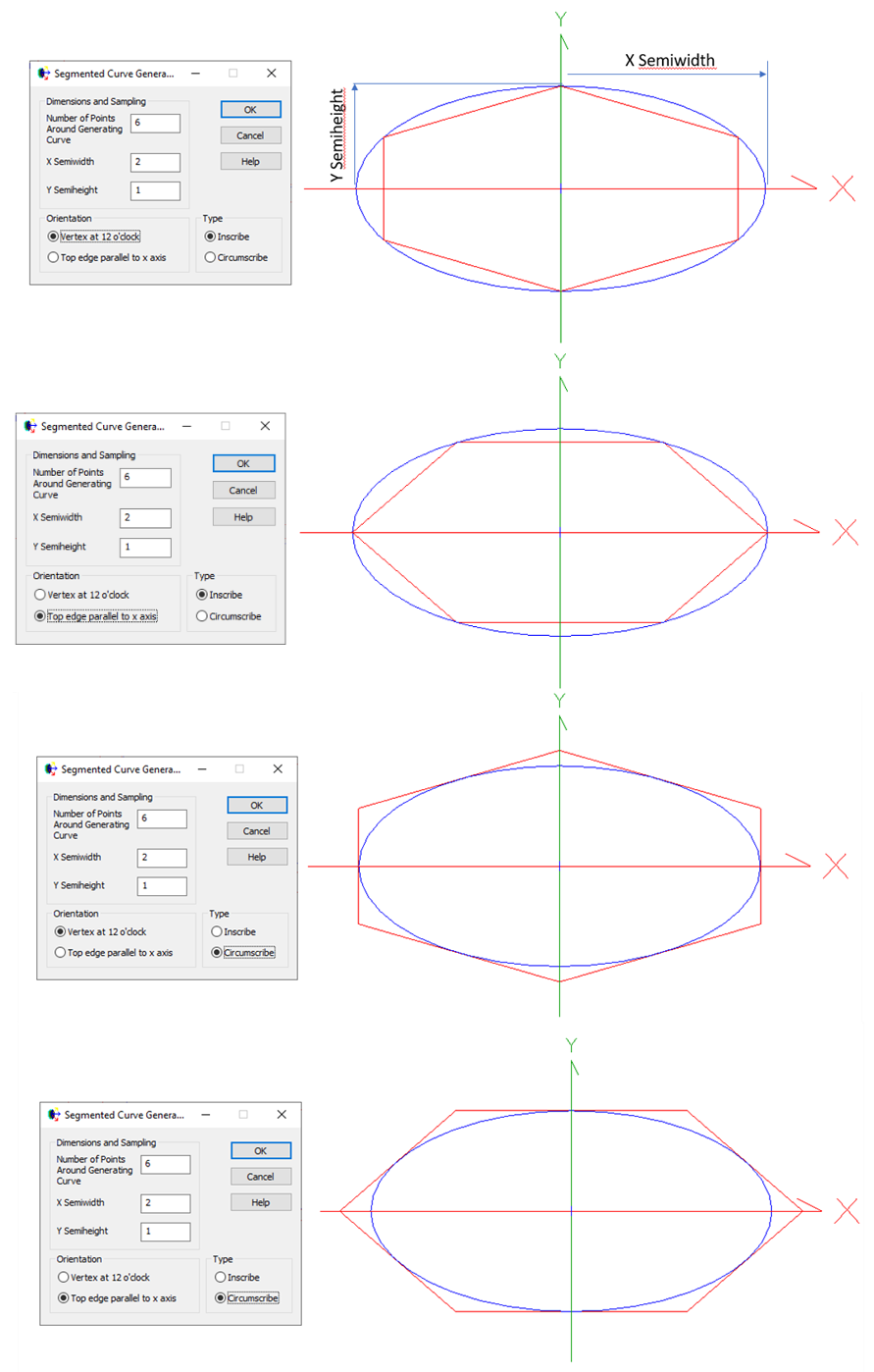
The X semi-width and Y semi-height dimensions define an elliptical curve from which the points are computed. The nominal angle between points is 360/(number of points); the x and y components of the angle vector from the enter of the ellipse are scaled by the X semi-width and Y semi-height.
The orientation and the inscribe/circumscribe options control how the segments are positioned around the elliptical curve as shown below:
The file format used by the "Replace with Data from File" is shown below. The first line must be "type segmented", the second line is "format [xy][xz][yz][xyz]", and the remaining lines are either two column data corresponding to the format specifications [xy],[xz],[yz] or three column data corresponding to the format specification [xyz]. E.g. for two column [yz]:
Digitizing points from an image Planar Segmented curves can also be digitized with the Digitization Tool.
Segmented curves can be turned into a collection of Cylinders using the "Generate Surfaces from Points" option. The utility of this feature is that the raytracing algorithm for cylinder surfaces is much faster than the raytracing algorithm for surfaces generated from segmented curves. Making this conversion can often be useful in creating individual sections of Fresnel Lenses or digitized housings for lenses where the many individual line segments used may induce a speed penalty during the raytrace.
Curve and curve-based surfaces Curve -Aperture Curve Collection
|
||||||||||||||||||||||||||||||||||||||||||||||||||||||
.png)