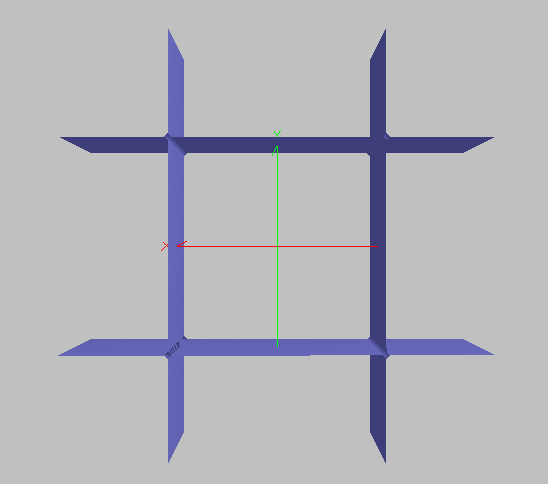
This feature allows creation of a cylindrical surface aligned along the z-axis and having front and back aperture shape factors between 0 (ellipse) and 1 (rectangle). Consider the image below which can be considered as four plane surfaces, two in the x-z cartesian plane and two in the y-z cartesian plane.
The functional form of this structure, assuming the four-plane construction, is the following:
Now consider the general equation for an ellipse:
The equations for the four-plane construction and the ellipse are identical with the exception of a factor x2y2! Supposing that we apply a scaling factor to the additional x2y2 term of the four-plane construction, the functional form becomes:
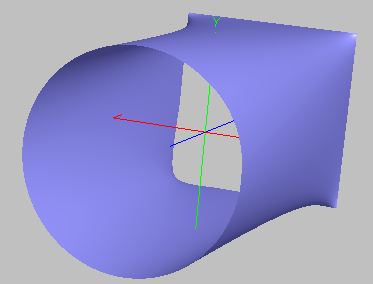
As the shape factor, q, varies between 0 and 1, the surface described by this function will have an aperture shape that can be specified as purely elliptical (q = 0), purely rectangular (q = 1), or anything in between. The image below shows a cylinder surface type with xsemi and ysemi = 1 at both the cylinder ends, Z locations at -2 and 2, q = 0 (ellipse) for the front end, and q = 1 (rectangle) for the back end.
This feature can be accessed by selecting Conicoid (Sphere, Ellipse, Parabola, Hyperbola, etc.) as the surface type on the Surface tab of a surface dialog box.
The Cylinder is a sagable surface.
The Z-location specification does not set the length of the cylinder surface. Rather, the Z-Location setting simply specifies the Z positions at which the cylinder surface has the designated aperture shapes. The length of the cylinder surface is set on the Aperture tab of the cylinder surface.
|
|||||||||||||||||||||||||||||||||||||||||||||||||||||||||