|
Description
Energy Density calculates power per volume for either incoherent or coherent rays as filtered by an analysis surface. FRED sums the flux at each pixel site then divides by a volume element. The "volume element" is defined by the X and Y pixel dimensions and an implied third dimension equal to the average of the X and Y dimensions.
Navigation
There are three different ways to execute this command:
•Menu > Analysis > Energy Density
•Ctrl + Shift + E
•Toolbar button: 
Controls
|
Control
|
Inputs / Description
|
Defaults
|
|
Use This Analysis Surface
|
|
Use This Analysis Surface
|
Lists the analysis surface used to filter rays.
|
Selected analysis surface
|
|
List of Available Analysis Surfaces
|
|
List of Available Analysis Surfaces
|
Lists the available analysis planes for use as the ray filter.
|
Available analysis surfaces
|
|
Pre-Analysis Ray Operations
|
|
Delete old rays and recreate all active sources
|
If checked, existing rays are deleted, and new rays are created before the analysis proceeds.
|
Unchecked if rays exist. Checked if no rays exist.
|
|
Raytrace all active rays
|
If checked, any existing rays are raytraced before the analysis is performed.
|
Unchecked if rays exist. Checked if no rays exist.
|
|
Plot the rays as they are being raytraced
|
If checked the rays will be drawn to the 3D view when traced.
|
Unchecked
|
|
Post-Analysis Operations
|
|
Create Analysis Results Node (ARN)
|
Adds an Analysis Results Node (ARN) to the Analysis Results folder on the object tree. The ARN being created stores the results of, and information about, the analysis being performed.
|
Unchecked
|
|
Name Prefix
|
The name of the ARN on the tree will be formed by combining this name prefix with an automatically generated numeric value, ensuring that the resulting ARN has a unique name string.
|
EnergyDensity
|
|
|
|
OK
|
Continue with calculation and close dialog box.
|
|
|
Cancel
|
Discard analysis and close dialog box.
|
|
|
Help
|
Access this Help page.
|
|
Application Notes
Angle of incidence
It is important to note that unlike irradiance calculations, which take into account the ray angle of incidence in the form of a cosine factor, the energy density simply calculates flux / volume irrespective of angle of incidence.
Image Artifact Diagnostic Tool
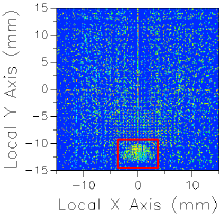
If a raytrace has been performed using the Advanced Raytrace option with ray paths enabled, contributing raypath information for a particular region of interest can be reported directly from the chart view for an incoherent spatial analysis or analyses using a Directional Analysis Entity. This feature can be executed by holding down the ALT keyboard button while using the mouse to select a region of the main chart view (turn of "perspective view" using the right mouse button menu option). This procedure is outlined in the following example:
|
|
1.Perform an Advanced Raytrace (ray paths on).
2.Perform an incoherent spatial or directional analysis (irradiance, illuminance, color image, position spots diagram).
3.In the main chart view hold ALT while using the mouse to select a region of interest (shown in red).
4.Resulting path information is printed to the output window.
|
The image artifact diagnostic tool will print the following information to the output window:
•Analysis surface used
•Selected region x-min, x-max, y-min and y-max
•Path number, path power and ray count for each contributing ray path (up to the first 30 paths, sorted by power)
•Remaining path count and total power for paths not listed in the output window
Related Topics
EnergyDensity (script command)
EnergyDensityToFileAS
EnergyDensityToFile
|
Copyright © Photon Engineering, LLC
|
|