|
Description
The Laser Beam (00 mode) type Source Primitive is used to define idealized Gaussian beams with small far-field divergence angles. The construction of the source uses a grid of sample points to propagate a set of collimated (coherent) rays that have been apodized spatially with a Gaussian envelope function. It is important to realize that although the rays representing the Gaussian field propagate as a collimated ray bundle, the field will exhibit the correct propagation characteristics of the Gaussian beam (amplitude, phase, diffraction, etc).
Navigation
This feature can be accessed in the following ways:
•Menu > Create > Source Primitive > Laser Beam (00 mode)
•Right mouse click on the Optical Sources folder, select Create New Source Primitive > Laser Beam (00 mode)
•Toolbar button: .png)
Controls
|
Control
|
Inputs / Description
|
Defaults
|
|
Logical Parent
|
Read-only. Specifies the source's parent node on the tree.
|
Optical Sources
|
|
Name
|
Name of the source as it will appear on the tree view.
|
Laser Beam (00 mode) N
|
|
Description
|
Description string that will be visible on the tree view.
|
|
|
Parameter Attributes
|
|
0
|
Total power of the source specified in Watts.
|
1.0
|
|
1
|
Specifies the number of spatial sample points across the diameter of the source grid. Increasing the number of sample points will result in finer spatial resolution of the beam profile.
|
21
|
|
2
|
1/e2 radius of the beam waist in the document's spatial units. The beam waist is located at the source plane.
|
0.5
|
|
3
|
Semi-aperture of the sampling grid of the source specified in the document's spatial units. The field of the Gaussian beam, defined by its 1/e2 waist radius, will only be represented out to the semi-aperture of the sampling grid. The semi-aperture of the source grid may be larger or smaller than the 1/e2 radius of the beam waist and can, therefore, represent a truncated Gaussian beam if desired.
|
1.0
|
|
Wavelength Attributes
|
|
Single or List
|
When the Single wavelength option is selected, the coherent field will be generated at the requested wavelength.
When the List wavelength option is selected, a Gaussian beam will be generated at each of the specified wavelengths with non-zero weights. The beams at each wavelength will have the same 1/e2 waist radius, as specified by source parameter 2, but will have a far-field divergence angle corresponding to its specific wavelength value.
|
Single at the default wavelength
|
|
Source Draw Color
|
If the Single wavelength option is selected, this setting controls the ray position and trajectory draw colors.
If the List wavelength option is selected, this setting only controls the ray position draw color. Ray trajectory draw color is controlled by the color specifications in the wavelength List for each wavelength.
|
|
|
Polarization
|
|
Polarization
|
If checked, polarization data for the rays is maintained and stored.
|
Unchecked
|
|
Handedness
|
Sets the handedness of the polarization state (relevant for non-linear polarization states). If the ray is propagating towards you, the electric field vector rotates in a clockwise direction for Right handedness and counter-clockwise for Left handedness.
Note that for linear polarization, the application of Left or Right handedness is arbitrary. The user may find that the UI display switches handedness depending on the angle of the linear polarization state entered, but this will have no impact on the resulting representation of the linear state.
|
Right
|
|
Ellipticity
|
Sets the ellipticity of the polarization state, 0 represents linear polarization and 1 represents circular.
|
0
|
|
Angle
|
Sets the angle of the polarization relative to the X axis.
|
90
|
|
|
|
OK
|
Accept settings and close dialog box.
|
|
|
Cancel
|
Discard settings and close dialog box.
|
|
|
Apply
|
Accept settings and keep dialog box open.
|
|
|
Help
|
Access this Help page.
|
|
Application Notes
Gaussian Beam Parameters
The following parameters describe characteristics of a Gaussian beam (shown schematically below) which can be used in verification of a source model.
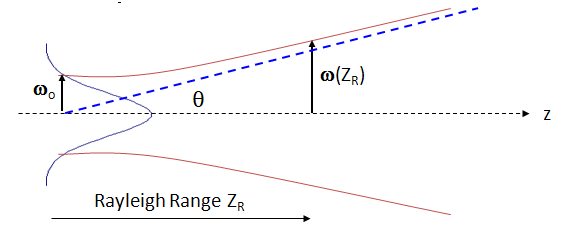
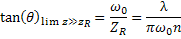
Minimum beam waist - w0
Minimum 1/e2 semi-aperture in irradiance (1/e in field amplitude) along the beam. q is the far-field divergence angle of the beam.
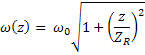
Beam waist at distance z - w(z)
Beam 1/e2 semi-aperture in irradiance (1/e in field amplitude) at a distance z from the minimum beam waist.
Rayleigh Range - ZR
Distance at which the beam area has doubled ( w(z) = 21/2 w0 ).

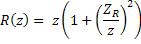
Wavefront Radius of Curvature - R(z)
Wavefront curvature at a distance z from the beam waist.
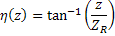
Phase - h(z)
Converting FWHM to 1/e2
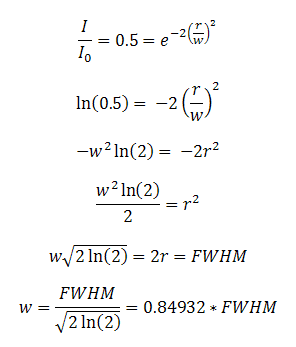
Laser beams are often specified by FWHM rather than 1/e2. A constant multiplier can be derived to convert from FWHM beam diameter to 1/e2 half width as derived below, where w is the 1/e2 half width.
Related Topics
Source Primitives
Plane Wave (coherent)
Point Source (coherent)
Astigmatic Gaussian Beam
Laser Diode Beam (coherent)
M-Squared Laser Beam (coherent)
|
Copyright © Photon Engineering, LLC
|
|