|
Description
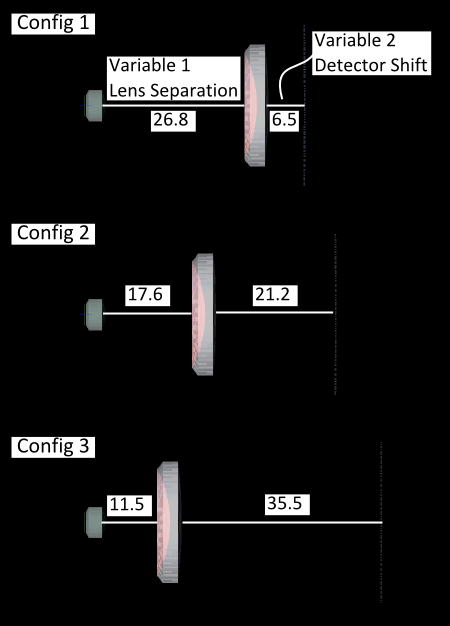
The System Configurations manager is a method for organizing and manipulating model configurations within a single document by defining system variables and their corresponding values in each configuration. For example, a two element zoom lens may be put into different configurations by controlling the lens separation and detector position as variables. An arbitrary number of configuration states can be defined for each desired combination of variable values. In the data table below, three configuration sets have been defined for the two-element zoom lens example. The variables "Lens Separation" and "Detector Shift" have preset values for each configuration state with the corresponding 3D view for each configuration being shown in the layouts below. Through the configuration manager, the user can quickly toggle between preset document states for analysis without needing to visit each variable dialog independently.
|
Variable
|
Config 1
|
Config 2
|
Config 3
|
|
Lens Separation
|
26.8
|
17.6
|
11.5
|
|
Detector Shift
|
6.5
|
21.2
|
35.5
|
|
|
|
When any of the configuration variables are modified in the document, the system is no longer considered "in" a configuration state. The status toolbar at the bottom of the FRED window will indicate whether the document is in a configured state, "Cfg: n", or in an unconfigured state, "Cfg: --".
Navigation
This feature can be accessed by selecting Optimize > System Configurations from the menu.
Controls
|
Control
|
Inputs / Description
|
Defaults
|
|
Description
|
User-defined description string of the configuration variable.
|
|
|
Variable
|
|
Entity
|
Indicates the entity whose parameter value is being designated for each configuration.
|
|
|
Type
|
Specifies the type of parameter whose value is being set for each configuration. A user-defined script type can be designated to access a custom parameter not available in the default list. Please see the Optimization Variables type list for available options.
|
|
|
Index#
|
For variable types which can contain multiple rows in a spreadsheet style list (ex. position/orientation or NURB control points), the Index# specifies which row contains the variable. Please see the Optimization Variables Index/Subindex convention list for more details.
Use a value of -1 if there are no index values associated with this parameter.
|
-1
|
|
Subindex#
|
Variables defined using an Index# scheme can also contain a Subindex# specification which points to a specific component of the entity. In this convention, the Index# can be thought of as the row of a spreadsheet and the Subindex# as the column. As an example, consider a position orientation specification list (spreadsheet format). Each row in the position/orientation list is a single operation and a particular operation would be called out in the variable definition by its Index#. Within each position/orientation operation there are one or more columns that define the operation values (ex. Rotate about X, Shift Y, etc.). Each column would be called out in the variable definition by its Subindex#. Please see the Optimization Variables Index/Subindex convention list for more details.
Use a value of -1 if there are no subindex values associated with this parameter.
|
-1
|
|
Variable Values
|
|
Config n
|
Specifies the value of each variable (table rows) for configuration n (Variable Values columns). Right mouse clicking in a configuration column allows the following configuration specific options:
•Append Configuration Column:
Adds a new configuration column to the end of the current configuration list.
•Insert Configuration Column:
Inserts a new configuration column at the location of the mouse click.
•Delete Configuration Column(s):
Deletes the currently selected configuration columns.
•Set as Current Configuration:
Applies the variable values for the selected configuration to the document. The configuration column header is flagged as active (*Config n*) and the system status bar is updated to reflect the active configuration (Cfg: n).
|
1
|
Application Notes
Configurations in Optimization
None of the optimization methods currently have the capability to optimize across configuration states. The current document state, whether configured or unconfigured, will be used in the optimization and the user is responsible for interpreting and applying those results in the context of their multiple configuration system.
Related Topics
Optimization Overview
Optimization Variables
|
Copyright © Photon Engineering, LLC
|
|