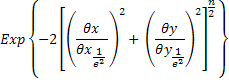
This apodization option scales the flux of each individual source ray according to its ray direction (in the source's local coordinate system) such that a Gaussian angular profile with the specified 1/e2 half width is achieved. The Gaussian function is always centered on the Z axis direction of the source node. This Gaussian directional apodization is usually applied to incoherent sources with random ray directions to represent beams for which coherent properties are disregarded. When applied to coherent Gaussian sources, erroneous results may be reported.
The functional form of the apodization function in angle space is given by the equation below, where Qx and Qy are the ray's direction in the local coordinate system of the source:
The Gaussian directional apodization is available on the Power tab of a Detailed Source dialog. From the Power tab, select "Gaussian" from the drop down menu of directional apodization types.
The following table describes the available controls on the Power tab of a Detailed Source dialog. Of interest to this help topic are the Direction Apodization parameter settings.
Direction Apodization - Uniform Unit Apodization Direction Apodization - Lambertian in a given direction Direction Apodization - Inverse Lambertian in a given direction Direction Apodization - cos^n or sin^n in a given direction Direction Apodization - Sampled as a function of Spherical Angles
|
||||||||||||||||||||||||||||||||||||||||||||||||||||||||
.png)