The Tabulated Cylinder is a simple extrusion of a curve. The user is prompted for the directrix (generating) curve and the length of the extrusion (in system units) along each of the local x-, y-, and z-axes. The extrusion lengths are used to form the vector that orients the extrusion axis. Although not a requirement, the curve is typically extruded along the axis perpendicular to the plane containing the generating curve. Except for extrusions in the plane of the curve, the cross section of an extrusion taken in the plane containing the generating curve has the exact same shape and form as the generating curve. Extrusions in the plane of the curve result in sheets with (possibly) irregular edges. If the curve is not closed, neither will the surface be closed. It may be necessary to add the sides and ends separately if the surface is to be used as a closed volume.
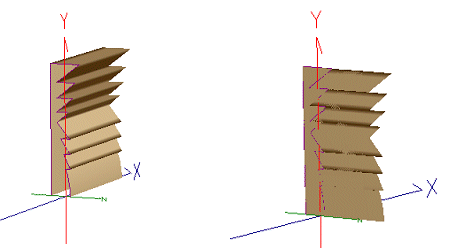
The figure below on the left shows an extrusion of the ‘lighthouse’ lens profile perpendicular to the plane of the curve. The figure on the right shows an extrusion in the plane of the same curve.
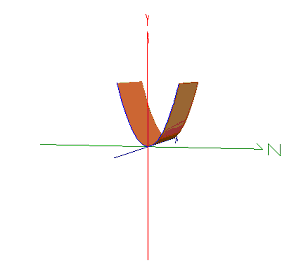
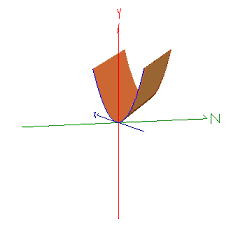
The following two figures show the extrusion of a parabolic curve defined in the YZ-plane along the X-axis (left) and the extrusion of a parabolic curve defined in the YZ-plane along an arbitrary axis. Note that any cross-section of the surface taken in the YZ-plane will have the same shape and dimensions as the base curve.
This feature can be accessed by selecting Tabulated Cylinder (straight line extruded curve) as the surface type on the Surface tab in a surface dialog box.
The Tabulated Cylinder is a "non-sagable" surface. Therefore, it cannot be used as a deforming surface.
|
||||||||||||||||||||||||||||||||||||||||||||||||||||||