A Surface of Revolution is formed by spinning a curve about an arbitrary axis. The user is prompted for the generating curve, the starting and ending rotation angles, and the local (x, y, z) coordinates for the rotation axis. Positive angles are measured counter-clockwise from the plane containing the generating curve, and the starting angle must be less than the ending angle. The rotation axis is the line connecting the starting and ending coordinates as entered by the user. Remember that FRED only creates surfaces and that a closed volume requires bounding surfaces.
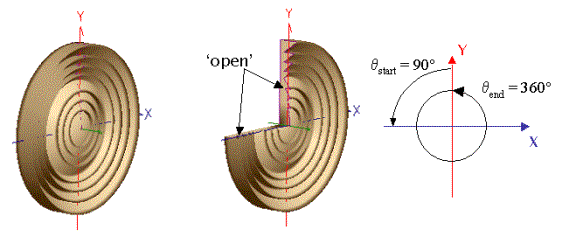
The figures below show two examples of a Surface of Revolution. The surface on the left shows a complete revolution while the surface on the right is only a partial revolution (start and end angles shown on the far right).
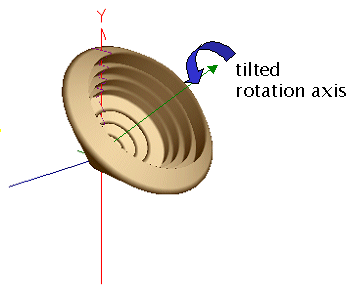
The figure below shows the same curve revolved around a tilted rotation axis.
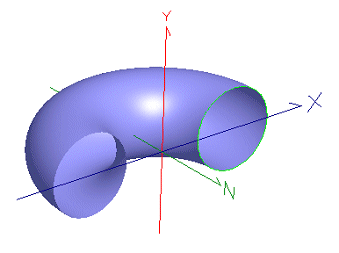
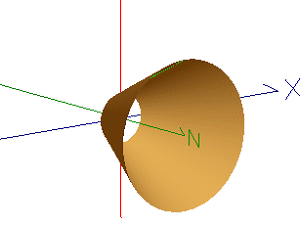
The following two figures show the construction of a torus and a cone made from a surface of revolution. The torus is created by revolving a Circular Arc around an offset axis while the cone was created by revolving a line segment in the YZ-plane about the z-axis.
This feature can be accessed by selecting Surface of Revolution (curve revolved around an axis) as the surface type on the Surface tab in a surface dialog box.
As a curve based surface, the Surface of Revolution type cannot be used as a trimming surface.
The Surface of Revolution is not a sagable surface.
|
|||||||||||||||||||||||||||||||||||||||||||||||||||||||||