|
Description
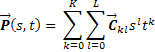
Creates a spline surface equivalent to IGES entity type 114 by specifying a collection of parametric (u,v) polynomial spline patches. The following table describes the mathematical form of the Spline surface.
|
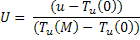
Normalized u, v parameter coordinates
|
|

|
|
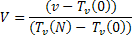
Un-normalized parameter coordinates
|
|


|
|
s, t local patch parameter coordinates
|
|


|
|
Patch (i,j)
|
|
|
|
Determination of s and t
|
|
  
  
|
|
Relation of U, V and u, v
|
|
|
Navigation
This feature can be accessed by selecting Spline Surface (collection of (u,v) polynomial spline patches) as the surface type on the Surface tab of a surface dialog box.
Controls
|
Control
|
Inputs / Description
|
Defaults
|
|
Logical Parent
|
Name of Parent entity.
|
Custom Element Name
|
|
Name
|
Name of surface supplied by user.
|
Surf n
|
|
Description
|
Description of the surface.
|
|
|
Traceable
|
Surface can be raytraced.
|
Checked
|
|
Use for trimming only
|
Never raytrace. Surface used for trimming only.
|
Unchecked
|
|
Type
|
Surface type.
|
Spline
|
|
Surface Settings
|
|
UV Degree
|
Polynomial degree
|
1,1
|
|
UV Breakpoints
|
Breakpoints
|
(0,1) (0,1)
|
|
Patch
|
Patch specifications
|
X(0,1) = Y(1,0) = 1, all others zero
|
|
|
|
OK
|
Accept settings and close dialog box.
|
|
|
Cancel
|
Discard settings and close dialog box.
|
|
|
Apply
|
Accept settings and keep dialog box open.
|
|
|
Help
|
Access this Help page.
|
|
Application Notes
Surface deformation
The Spline Surface is a sagable surface.
Related Topics
Surface types summary
Create a new surface
|
Copyright © Photon Engineering, LLC
|
|