The Super-Gaussians Superposition Surface (SGSS) is a sagable implicit surface defined by the superposition of multiple decentered and rotated gaussians. Functionally, the SGSS has the following form:
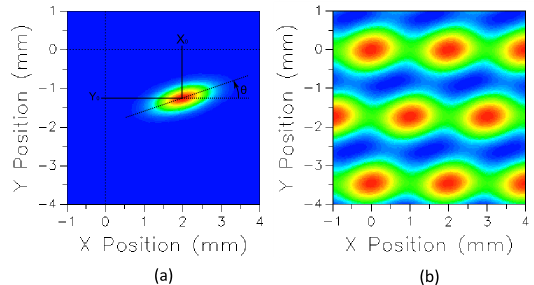
Each term in the summation g(x,y) is superimposed without a cutoff value in the surface sag. An example of the surface's capabilities, the image below shows the height map for; (a) a single offset and rotated gaussian term with offset terms X0 and Y0 and rotation angle q labeled, and (b) the superposition of a hexagonal array of terms with equal parameterization.
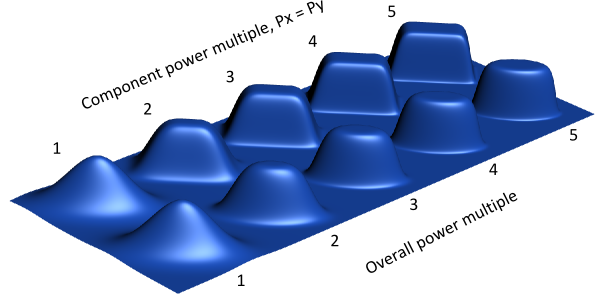
Adjusting the component powers, Pxi and Pyi, or the overall power multiple, Pi, will result in either rectangular or elliptical gaussian profiles. The image below illustrates how the surface profile varies with power multiple for the cases of purely elliptical and purely rectangular gaussian terms. In the case of the rectangular terms, Px = Py for all power multiples.
Uses for the Super-Gaussians Superposition Surface may include adding a diffusing sag profile to an existing base surface or to model the influence function of actuators in deformable surfaces.
This feature can be accessed by selecting Super-Gaussians Superposition Surface as the surface type on the Surface tab of a surface dialog box.
Adding, Inserting and Appending Terms Terms in the SGSS can be added, inserted and appended to the term list spreadsheet by right mouse clicking anywhere in the spreadsheet area to open a context list menu. Options exist on the context menu for both single term modification and multiple term modification. When multiple term modification is selected, identical super-gaussians can be created on a spatial grid with hexagonal or rectangular cells and an elliptical or rectangular grid aperture.
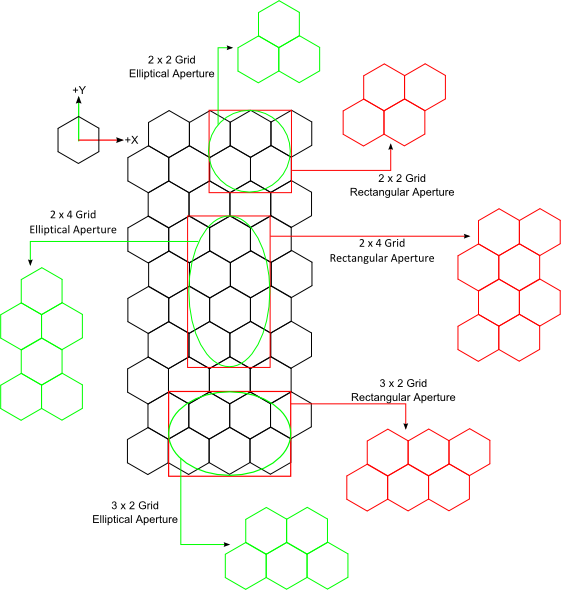
The diagram below shows several examples of how cells are selected for inclusion in the term list for the case of hexagonal cell apertures. First, the cell width is specified and the grid aperture dimensions are determined from the cell width and the number of cells requested in each direction. If a carpet of hex cells is laid out the rectangular aperture can be considered centered on the carpet such that for a grid with M cells in X and N cells in Y, M cells fit exactly within the X width of the aperture. With the aperture in place, M cells in the grid are selected by starting from the +X, +Y corner of the aperture and proceeding along the row in the -X direction. The cell center must lie on or within the boundary of the aperture to be kept. This procedure is repeated for each of the N rows defined in the grid. When an elliptical aperture is used, the cells determined for the rectangular aperture are checked for exclusion from the elliptical aperture based on their cell centers.
|
|||||||||||||||||||||||||||||||||||||||||||||||||||||||||||||||||||||||||||||||||||||||||||||||||||||||||||||||||||||||||||||||||||||||||||||