The Ruled Surface type connects two curves of any type, open or closed, which do not have to have the same shape. The curve connection method is specified by the user to either connect the start of the first curve to the start of the second curve, or to connect the start of the first curve to the end of the second curve. When the first option is selected, each parametric value on the first curve, un, is connected to the matching parametric value on the second curve . When the second option is selected, each parametric value, un, on the first curve is connected to the parametric value 1- un on the second curve. The second option is often the best choice if the curves are defined in opposite directions, i.e., clockwise and counter-clockwise for closed curves or with increasing parameterization along +X and –X for open curves. A quick check of the system view after any change has been applied is usually sufficient to determine if the desired surface has been created.
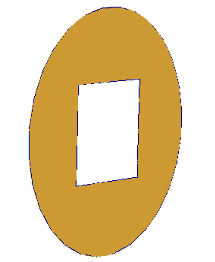
The most common application of the Ruled Surface is to create a tube with different aperture shapes on each end. Likewise, apertures such as a round disk with a square hole in the center (really a zero length cylinder) can be modeled with this surface type by connecting the inner square to the outer circle (see image below). The ruled surface generates a smoother surface than the function based Cylinder surface when one or both of the ends has sharp corners.
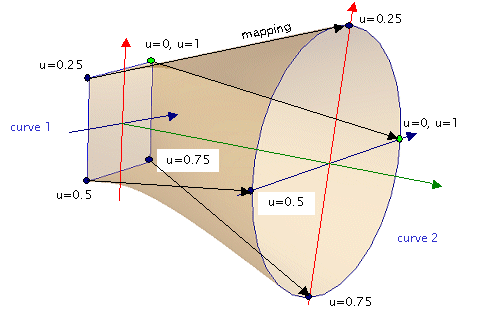
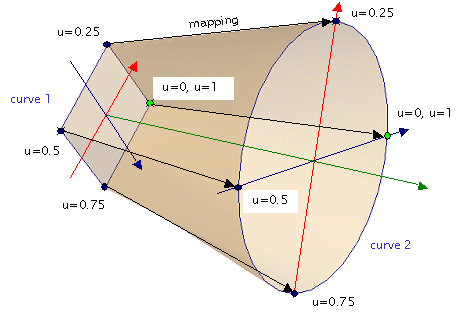
The following figures illustrate a Ruled Surface created with a square (Segmented) curve and a circle (Circular arc) to illustrate how the two curves are connected. The top figure shows a cylinder surface that is twisted because the starting points on each curve are rotated 45 degrees with respect to one another. In the bottom figure, the curves have been properly oriented to create the ‘correct’ surface. The twist was removed by rotating the square curve about its local z-axis by 45 degrees.
This feature can be accessed by select Ruled Surface (two connected curves) as the surface type on the Surface tab of a surface dialog box.
The Ruled Surface is a "non-sagable" surface. Therefore, it cannot be used as a deforming surface.
|
||||||||||||||||||||||||||||||||||||||||||||||||||||||