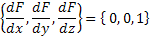
Creates a plane surface. The following table describes the functional form of the plane surface.
This feature can be accessed by selecting Plane as the surface type on the Surface tab of a surface dialog box.
The Plane is a "sagable" surface.
|
|||||||||||||||||||||||||||||||||||||||||||||||||
Creates a plane surface. The following table describes the functional form of the plane surface.
This feature can be accessed by selecting Plane as the surface type on the Surface tab of a surface dialog box.
The Plane is a "sagable" surface.
|
|||||||||||||||||||||||||||||||||||||||||||||||||