|
Description
This data structure defines a single ray selection filter operation (ex. "Rays on the specified surface") that gets applied during ray-based analyses (ex. Irradiance) or a ray-manipulation operation (ex. Redraw ray history). Consider the GUI dialog below for defining a single ray selection filter operation. Each of the entries in the dialog corresponds to a single member of the T_RAYFILTEROP data structure, as annotated below, though not all ray selection filter criteria require a datum, comparator or StringDatum entry, in which case the GUI does not display the members that are not needed.
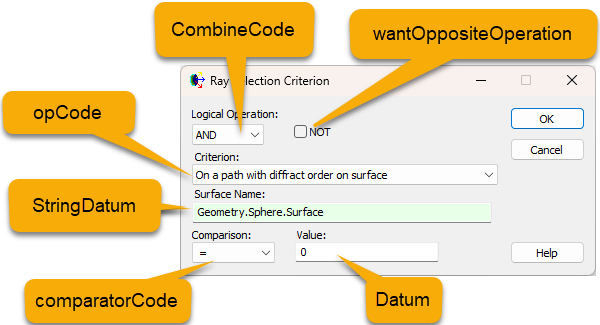
Note that when building filters for scripts, a faster and less error prone method exists via the GUI by building the filter in any Ray Selection Filter area (e.g. of an analysis surface) then choosing the r-click context menu options to copy the filter to scripting commands then pasting the filter into the script.
Definition
Type T_RAYFILTEROP
datum As Double
combineCode As Long
comparatorCode as Long
opCode As Long
stringDatum As String
text As String
wantOppositeOperation As Boolean
Members
datum
This member contains the numeric value associated with the ray selection criteria being defined and whose meaning is determined by the opCode member. Note that not all ray selection criteria definitions require a numeric datum value. The table below indicates which criteria require a datum entry.
combineCode
This member specifies how the criteria is combined with the results of any previous ray selection criteria. This entry is superfluous for the first ray selection criterion, as there are no previous criteria to be combined with. Possible values are:
|
Value
|
Meaning
|
|
0
|
AND
|
|
1
|
OR
|
|
2
|
XOR
|
comparatorCode
This member defines the numeric comparison test to be applied to the datum value. Possible values are:
|
Value
|
Meaning
|
|
0
|
< (less than)
|
|
1
|
<= (less than or equal to)
|
|
2
|
= (equals)
|
|
3
|
>= (greater than or equal to)
|
|
4
|
> (greater than)
|
|
5
|
!= (not equal to)
|
opCode
This member specifies the type of ray selection criterion being defined. Refer to the table below for a complete list of opCode values and their associated filter criteria.
stringDatum
This member is used to specify entity names that are associated with some criteria. For example, definition of a "Rays on a specified surface" ray selection criterion requires that a node be provided (the "surface" in the criteria definition). The full name of the corresponding node of interest is specified using the text member. Refer to the table below, which indicates whether a stringDatum entry is required for any given ray selection criterion.
text
This member is used to store the filter description as displayed in the GUI. For example, "Rays on surface 'Geometry.Plane.Surface 1'".
wantOppositeOperation
When True, this member will negate the conditional logic in the ray selection criteria. When the conditional logic of the ray selection criteria is intended to be applied as-is, this member should be set to False. The behavior change of the conditional logic as it pertains to wantOppositeOperation is listed in the table below.
|
Conditional Logic
|
When wantOppositeOperation = True
|
|
<= (less than or equal to)
|
> (greater than)
|
|
== (equal to)
|
!= (not equal to)
|
For example, a common ray selection criteria is "Rays on the specified surface". In order to specify a ray selection criteria of the type, "Rays NOT on the specified surface", the T_RAYFILTEROP data structure configuration would be the following, where the wantOppositeOperation is used to flip the conditional logic:
|
Member
|
Value
|
|
opCode
|
106
|
|
stringDatum
|
"Geometry.Example.Surface"
|
|
wantOppositeOperation
|
True
|
Refer to the table below for a full listing of the available ray selection filter criteria.
Remarks
The table below lists the correspondence between the opCode values and their associated ray selection filter criteria meanings. Where the Datum is required for an opCode value, then generally the comparatorCode is also available although there are a few exceptions to this (such as the filter for "Rays on a specific path"). If in doubt consult the use of the filter via the GUI.
|
Filter Criteria
|
|
|
(
|
opCode
|
10100
|
|
)
|
opCode
|
10101
|
|
All rays
|
opCode
|
100
|
|
Datum
|
Not applicable
|
|
stringDatum
|
Not applicable
|
|
No rays
|
opCode
|
101
|
|
Datum
|
Not applicable
|
|
stringDatum
|
Not applicable
|
|
Coherent rays
|
opCode
|
102
|
|
Datum
|
Not applicable
|
|
stringDatum
|
Not applicable
|
|
Incoherent rays
|
opCode
|
103
|
|
Datum
|
Not applicable
|
|
stringDatum
|
Not applicable
|
|
Polarized rays
|
opCode
|
104
|
|
Datum
|
Not applicable
|
|
stringDatum
|
Not applicable
|
|
Unpolarized rays
|
opCode
|
105
|
|
Datum
|
Not applicable
|
|
stringDatum
|
Not applicable
|
|
Rays on the specified surface
|
opCode
|
106
|
|
Datum
|
Not applicable
|
|
stringDatum
|
Full name of the surface
ex. "Geometry.Example.Surface"
ex. GetFullName( surfNode )
|
|
Rays from the specified source
|
opCode
|
107
|
|
Datum
|
Not applicable
|
|
stringDatum
|
Full name of the source
ex. "Optical Sources.Source 1"
ex. GetFullName( sourceNode )
|
|
Rays in the specified material
|
opCode
|
108
|
|
Datum
|
Not applicable
|
|
stringDatum
|
Name of the material
ex. "Air"
ex. GetMaterialName( matNode )
|
|
Every N'th ray
|
opCode
|
109
|
|
Datum
|
N'th ray
|
|
stringDatum
|
Not applicable
|
|
Incoherent power
|
opCode
|
110
|
|
Datum
|
Power value
|
|
stringDatum
|
Not applicable
|
|
Optical path length
|
opCode
|
111
|
|
Datum
|
Path length value
|
|
stringDatum
|
Not applicable
|
|
Wavelength (um) <= value
|
opCode
|
112
|
|
Datum
|
Wavelength value
|
|
stringDatum
|
Not applicable
|
|
X in specified coordinate system
|
opCode
|
113
|
|
Datum
|
X value
|
|
stringDatum
|
Full name of the coordinate system node
ex. "Geometry.Example.Surface"
ex. GetFullName( surfNode )
|
|
Y in specified coordinate system
|
opCode
|
114
|
|
Datum
|
Y value
|
|
stringDatum
|
Full name of the coordinate system node
ex. "Geometry.Example.Surface"
ex. GetFullName( surfNode )
|
|
Z <= value in specified coordinate system
|
opCode
|
115
|
|
Datum
|
Z value
|
|
stringDatum
|
Full name of the coordinate system node
ex. "Geometry.Example.Surface"
ex. GetFullName( surfNode )
|
|
X direction component in specified coordinate system
|
opCode
|
116
|
|
Datum
|
X direction value
|
|
stringDatum
|
Full name of the coordinate system node
ex. "Geometry.Example.Surface"
ex. GetFullName( surfNode )
|
|
Y direction component in specified coordinate system
|
opCode
|
117
|
|
Datum
|
Y direction value
|
|
stringDatum
|
Full name of the coordinate system node
ex. "Geometry.Example.Surface"
ex. GetFullName( surfNode )
|
|
Z direction component in specified coordinate system
|
opCode
|
118
|
|
Datum
|
Z direction value
|
|
stringDatum
|
Full name of the coordinate system node
ex. "Geometry.Example.Surface"
ex. GetFullName( surfNode )
|
|
Radial distance from X axis in specified coordinate system
|
opCode
|
119
|
|
Datum
|
Radial distance
|
|
stringDatum
|
Full name of the coordinate system node
ex. "Geometry.Example.Surface"
ex. GetFullName( surfNode )
|
|
Radial distance from Y axis in specified coordinate system
|
opCode
|
120
|
|
Datum
|
Radial distance
|
|
stringDatum
|
Full name of the coordinate system node
ex. "Geometry.Example.Surface"
ex. GetFullName( surfNode )
|
|
Radial distance from Z axis in specified coordinate system
|
opCode
|
121
|
|
Datum
|
Radial distance
|
|
stringDatum
|
Full name of the coordinate system node
ex. "Geometry.Example.Surface"
ex. GetFullName( surfNode )
|
|
Radial distance from X direction in specified coordinate system
|
opCode
|
122
|
|
Datum
|
Radial direction distance
|
|
stringDatum
|
Full name of the coordinate system node
ex. "Geometry.Example.Surface"
ex. GetFullName( surfNode )
|
|
Radial distance from Y direction in specified coordinate system
|
opCode
|
123
|
|
Datum
|
Radial direction distance
|
|
stringDatum
|
Full name of the coordinate system node
ex. "Geometry.Example.Surface"
ex. GetFullName( surfNode )
|
|
Radial distance from Z direction in specified coordinate system
|
opCode
|
124
|
|
Datum
|
Radial direction distance
|
|
stringDatum
|
Full name of the coordinate system node
ex. "Geometry.Example.Surface"
ex. GetFullName( surfNode )
|
|
Rays on the specified ray path
|
opCode
|
125
|
|
Datum
|
Ray path number
|
|
stringDatum
|
Not applicable
|
|
Scattered rays
|
opCode
|
126
|
|
Datum
|
Not applicable
|
|
stringDatum
|
Not applicable
|
|
Scattered ancestry
|
opCode
|
127
|
|
Datum
|
Scatter ancestry value
|
|
stringDatum
|
Not applicable
|
|
Specular rays
|
opCode
|
128
|
|
Datum
|
Not applicable
|
|
stringDatum
|
Not applicable
|
|
Specular ancestry
|
opCode
|
129
|
|
Datum
|
Specular ancestry value
|
|
stringDatum
|
Not applicable
|
|
Total ray intersection count
|
opCode
|
130
|
|
Datum
|
Total intersection count value
|
|
stringDatum
|
Not applicable
|
|
Consecutive ray intersection count
|
opCode
|
131
|
|
Datum
|
Consecutive intersection count value
|
|
stringDatum
|
Not applicable
|
|
Rays with errors
|
opCode
|
132
|
|
Datum
|
Not applicable
|
|
stringDatum
|
Not applicable
|
|
Ray number N
|
opCode
|
133
|
|
Datum
|
Ray number
|
|
stringDatum
|
Not applicable
|
|
Absorbed rays
|
opCode
|
134
|
|
Datum
|
Not applicable
|
|
stringDatum
|
Not applicable
|
|
Diffract ancestry
|
opCode
|
135
|
|
Datum
|
Diffraction ancestry value
|
|
stringDatum
|
Not applicable
|
|
Total ancestry
|
opCode
|
136
|
|
Datum
|
Total ancestry value
|
|
stringDatum
|
Not applicable
|
|
Rays assigned to a ray path
|
opCode
|
137
|
|
Datum
|
Not applicable
|
|
stringDatum
|
Not applicable
|
|
On a path including a specified surface
|
opCode
|
138
|
|
Datum
|
Not applicable
|
|
stringDatum
|
Full name of the surface
ex. "Geometry.Example.Surface"
ex. GetFullName( surfNode )
|
|
On a path with event count
|
opCode
|
139
|
|
Datum
|
Event count value
|
|
stringDatum
|
Not applicable
|
|
On a path with scatter event on surface
|
opCode
|
140
|
|
Datum
|
Not applicable
|
|
stringDatum
|
Full name of the surface
ex. "Geometry.Example.Surface"
ex. GetFullName( surfNode )
|
|
On a path with scatter refl on a surface
|
opCode
|
141
|
|
Datum
|
Not applicable
|
|
stringDatum
|
Full name of the surface
ex. "Geometry.Example.Surface"
ex. GetFullName( surfNode )
|
|
On a path with scatter tran on a surface
|
opCode
|
142
|
|
Datum
|
Not applicable
|
|
stringDatum
|
Full name of the surface
ex. "Geometry.Example.Surface"
ex. GetFullName( surfNode )
|
|
On a path with specular event on surface
|
opCode
|
143
|
|
Datum
|
Not applicable
|
|
stringDatum
|
Full name of the surface
ex. "Geometry.Example.Surface"
ex. GetFullName( surfNode )
|
|
On a path with specular refl on surface
|
opCode
|
144
|
|
Datum
|
Not applicable
|
|
stringDatum
|
Full name of the surface
ex. "Geometry.Example.Surface"
ex. GetFullName( surfNode )
|
|
On a path with specular tran on surface
|
opCode
|
145
|
|
Datum
|
Not applicable
|
|
stringDatum
|
Full name of the surface
ex. "Geometry.Example.Surface"
ex. GetFullName( surfNode )
|
|
On a path with diffract event on surface
|
opCode
|
146
|
|
Datum
|
Not applicable
|
|
stringDatum
|
Full name of the surface
ex. "Geometry.Example.Surface"
ex. GetFullName( surfNode )
|
|
On a path with diffract refl on surface
|
opCode
|
147
|
|
Datum
|
Not applicable
|
|
stringDatum
|
Full name of the surface
ex. "Geometry.Example.Surface"
ex. GetFullName( surfNode )
|
|
On a path with diffract tran on surface
|
opCode
|
148
|
|
Datum
|
Not applicable
|
|
stringDatum
|
Full name of the surface
ex. "Geometry.Example.Surface"
ex. GetFullName( surfNode )
|
|
On a path with diffract order on surface
|
opCode
|
149
|
|
Datum
|
Diffraction order
|
|
stringDatum
|
Full name of the surface
ex. "Geometry.Example.Surface"
ex. GetFullName( surfNode )
|
|
On a path with diffract refl order on surface
|
opCode
|
150
|
|
Datum
|
Diffraction order
|
|
stringDatum
|
Full name of the surface
ex. "Geometry.Example.Surface"
ex. GetFullName( surfNode )
|
|
On a path with diffract tran order on surface
|
opCode
|
151
|
|
Datum
|
Diffraction order
|
|
stringDatum
|
Full name of the surface
ex. "Geometry.Example.Surface"
ex. GetFullName( surfNode )
|
|
On a path with specular tran event count
|
opCode
|
152
|
|
Datum
|
Event count
|
|
stringDatum
|
Not applicable
|
|
On a path with specular refl event count
|
opCode
|
153
|
|
Datum
|
Event count
|
|
stringDatum
|
Not applicable
|
|
On a path with scatter tran event count
|
opCode
|
154
|
|
Datum
|
Event count
|
|
stringDatum
|
Not applicable
|
|
On a path with scatter refl event count
|
opCode
|
155
|
|
Datum
|
Event count
|
|
stringDatum
|
Not applicable
|
|
On a path with diffract tran event count
|
opCode
|
156
|
|
Datum
|
Event count
|
|
stringDatum
|
Not applicable
|
|
On a path with diffract refl event count
|
opCode
|
157
|
|
Datum
|
Event count
|
|
stringDatum
|
Not applicable
|
|
Rays that have volume scattered
|
opCode
|
158
|
|
Datum
|
Not applicable
|
|
stringDatum
|
Not applicable
|
|
On a path with ray count
|
opCode
|
159
|
|
Datum
|
Ray count
|
|
stringDatum
|
Not applicable
|
|
On a path with ray power
|
opCode
|
160
|
|
Datum
|
Ray power
|
|
stringDatum
|
Not applicable
|
|
On a path with specular TIR on surface
|
opCode
|
161
|
|
Datum
|
Not applicable
|
|
stringDatum
|
Full name of the surface
ex. "Geometry.Example.Surface"
ex. GetFullName( surfNode )
|
|
On a path with specular TIR event count
|
opCode
|
162
|
|
Datum
|
Event count
|
|
stringDatum
|
Not applicable
|
|
Ray Angle of Incidence / Exitance (Deg)
|
opCode
|
163
|
|
Datum
|
Ray Angle (Deg)
|
|
stringDatum
|
Not applicable
|
Example - Scattered Rays
The following example demonstrates the use of the ray filter operation commands as they relate to detector entities. In this example the operation count for a detector entity is retrieved and the operation at index 0 is retrieved and modified before the analysis is performed.
Sub Main
Dim rfOp As T_RAYFILTEROP
Dim deNode As Long, opCount As Long, cnt As Long, arnNode As Long
Dim success As Boolean
deNode = FindFullName( "Analysis Surface(s).Cylinder Detector Entity" )
opCount = DEGetOpCount( deNode )
Print "Detector entity " & deNode & " has " & opCount & " ray filter operations."
'Get, modify, and set the 0'th operation in the list
success = DEGetIthOp( deNode, 0, rfOp )
rfOp.opCode = 126 'scattered rays
DESetIthOp deNode, 0, rfOp
'Perform analysis with modified ray filter
cnt = DEPerformAnalysis( deNode )
Print "Detector entity analysis results stored in ARN " & DEGetMostRecentARNNum( deNode )
End Sub
Example - Array of T_RAYFILTEROP
Some functions in FRED require an array of T_RAYFILTEROP structures be used as an argument . The example below shows a custom function that accepts a surface node number as an argument and then constructs a T_RAYFILTEROP array that would filter for specular rays on the surface of interest. This custom function then returns the T_RAYFILTEROP array back to the Main subroutine, where the return value is placed in the local tFilter() array variable, and then used in the RedrawRayHistory() function.
Sub Main
Dim surfNode As Long
surfNode = FindFullName( "Geometry.Detectors.Plane.Surface" )
'Construct the ray filter operation list
Dim tFilter() As T_RAYFILTEROP
tFilter() = ConstructFilter( surfNode )
'Redraw ray history
RedrawRayHistory( tFilter() )
End Sub
Function ConstructFilter( ByVal in_surf As Long ) As Variant
'This is a helper function that constructs a ray selection filter
Dim tFilt(1) As T_RAYFILTEROP
'First filter array element
tFilt(0).opCode = 128 'specular rays
'Second filter array element
tFilt(1).opCode = 106 'rays on a specific surface
tFilt(1).stringDatum = GetFullName( in_surf )
Return tFilt()
End Function
See Also
AddAnalysisSurfOp
GetAnalysisSurfIthOp
SetAnalysisSurfIthOp
DEDeleteIthOp
DEGetIthOp
DESetIthOp
|
Copyright © Photon Engineering, LLC
|
|