Description Solves a set of linear equations having the form M x = b for the vector x when supplied with M and b as defined below:
Syntax status = LinearEquationSolve ( M, b, x )
Parameters status (Integer) Holds the status of the solution attempt. Possible values are: 0An error occurred. 1An exact solution was found. 2Inconsistent equations (there is no exact solution). The computed value for x is the "closest" answer in the sense that M x is as close as possible to b. 3More variables than constraints (there is an infinite number of solutions). In this case the computed value for x is the solution with the smallest values. 4More constraints than variables (there is no exact solution). The computed value for x is the "closest" answer in the sense that M x is as close as possible to b.
M() As Double The known matrix, M.
b() As Double The known right hand side vector, b.
x() As Double The solution vector, x, to be solved for.
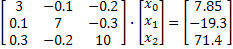
General Example Consider the following set of equations to be solved for x:
The following script uses the LoadTable command to populate the known arrays, solves the equation set and then prints out the solution vector.
Dim M( 2, 2 ) As Double, x() As Double, b( 2 ) As Double Dim flag As Integer
'load the data into M and b. Note that LoadTable groups data by columns. LoadTable M, "[3 0.1 0.3] [-0.1 7 -0.2] [-0.2 -0.3 10]" LoadTable b, "7.85 -19.3 71.4"
'solve the equations and print the solution vector flag = LinearEquationSolve( M, b, x ) Print "Return value is: " & flag Print "x = (" & x(0) & ", " & x(1) & ", " & x(2) & " )"
Chirped Holographic Grating Example In this example, the LinearEquationSolve function is used to determine the phase departure terms for a chirped HOE. The grating spacing equation and phase function for the holographic optical element in one dimension are given by:
d(y) = lref /[ a + 2by + 3cy2 + ... ] f(y) = lref /[ ay + by2 + cy3 + ...]
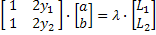
Provided the starting and ending grating spacings and positions and reference wavelength, the above equations can be solved for the phase departure coefficients. Suppose that the chirped HOE has the following requirements: lref = 5.0E-4 mm, 1250 lp/mm at y = -25 and 1500 lp/mm at y = +25. The equations to be solved become:
The following script solves the linear equations above and sets a surface's grating definition correspondingly.
Dim ho As T_HOE, coefs() As Double Sub Main Dim idsurf As Long, idsrc As Long, wv As Double
'find the nodes of interest idsurf=FindFullName( "Geometry.Plane.Surface" ) idsrc=FindFullName( "Optical Sources.Source 1" )
'get the source's 0'th wavelength wv=GetSourceIthWavelength(idsrc,0)
'check to see if there is already a HOE specification on the surface If GetDiffractType(idsurf)="XY" Then GetDiffractHOE idsurf, ho, ptype, coefs End If
'calculate the chirped grating parameters using a subroutine. 'provide the grating direction, starting and ending grating spacings, starting and ending positions, wavelength chirpedgratingset "Y", 1250, 1500, -25, 25, wv
'set the values for the HOE ho.exposureWavelength=wv SetDiffractHOE idsurf,ho, "XY", coefs
'update the document Update Print "grating configured"
End Sub
Sub chirpedgratingset(ca As String, L1 As Double,L2 As Double,a1 As Double,b1 As Double, w As Double) Dim M(1,1) As Double, v(1) As Double, f(1) As Double
v(0)=(w*1e-3)*L1 v(1)=(w*1e-3)*L2
M(0,0)=1 : M(0,1)=2*a1 M(1,0)=1 : M(1,1)=2*b1
LinearEquationSolve(M,v,f)
Select Case ca Case "X" ReDim coefs(3) coefs(0)=0 'x0y0 coefs(1)=f(0) 'x1y0 coefs(2)=0 'x0y1 coefs(3)=f(1) 'x2y0 Case "Y" ReDim coefs(5) coefs(0)=0 'x0y0 coefs(1)=0 'x1y0 coefs(2)=f(0) 'x0y1' coefs(3)=0 'x2y0 coefs(4)=0 'x1y1 coefs(5)=f(1) 'x0y2 End Select
End Sub
See Also
|