Description Returns the number of location/orientation operations defined for a given FRED entity.
Syntax count = GetOperationCount ( n )
Parameters count (Long) The number of primitive linear operations.
n As Long Node number for the FRED entity.
Remarks If there is a problem, the function posts an error and returns a value of 0.
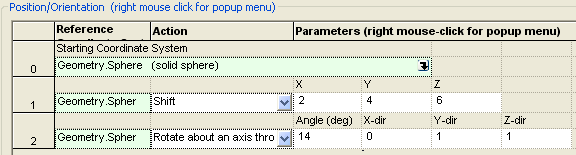
Example Suppose that an entity of interest has the following operation list as displayed in the GUI:
The following script will individually access each operation using the GetOperation subroutine and print out the information for each operation to the output window. The GetOperationCount routine is used to set the proper counter in the loop over each operation.
Sub Main
Dim op As T_OPERATION Dim pNode As Long, opCount As Long, ii As Long
ClearOutputWindow
'get the node number of the entity whose operations list we wish to query pNode = FindFullName( "Geometry.Plane" )
'get the number of operations applied to the entity opCount = GetOperationCount( pNode )
'loop over the operations and print out the operation's settings For ii = 0 To opCount-1 'retrieve operation # ii and load the information into op GetOperation pNode, ii, op 'print out all information for that operation Print "Operation : " & ii Print Chr(9) & " Parent: " & Chr(9) & GetFullName( op.parent ) Print Chr(9) & " Op Type: " & Chr(9) & op.Type Print Chr(9) & " Val 1: " & Chr(9) & op.val1 Print Chr(9) & " Val 2: " & Chr(9) & op.val2 Print Chr(9) & " Val 3: " & Chr(9) & op.val3 Print Chr(9) & " Val 4: " & Chr(9) & op.val4 Print Chr(9) & " Val 5: " & Chr(9) & op.val5 Print Chr(9) & " Val 6: " & Chr(9) & op.val6 Print Chr(9) & " Val 7: " & Chr(9) & op.val7 Print Chr(9) & " Val 8: " & Chr(9) & op.val8 Print Chr(9) & " Val 9: " & Chr(9) & op.val9 Print Chr(9) & " Val 10: " & Chr(9) & op.val10 Print Chr(9) & " Val 11: " & Chr(9) & op.val11 Print Chr(9) & " Val 12: " & Chr(9) & op.val12 Print Chr(9) & " Val 13: " & Chr(9) & op.val13 Next ii
End Sub
For the operation list shown above, this script would print out the following information to the output window: Operation : 0 Parent: Geometry.Sphere Op Type: Reparent Val 1: 0 Val 2: 0 Val 3: 0 Val 4: 0 Val 5: 0 Val 6: 0 Val 7: 0 Val 8: 0 Val 9: 0 Val 10: 0 Val 11: 0 Val 12: 0 Val 13: 0 Operation : 1 Parent: Geometry.Sphere Op Type: Shift Val 1: 2 Val 2: 4 Val 3: 6 Val 4: 0 Val 5: 0 Val 6: 0 Val 7: 0 Val 8: 0 Val 9: 0 Val 10: 0 Val 11: 0 Val 12: 0 Val 13: 0 Operation : 2 Parent: Geometry.Sphere Op Type: RotateOrigin Val 1: 14 Val 2: 0 Val 3: 1 Val 4: 1 Val 5: 0 Val 6: 0 Val 7: 0 Val 8: 0 Val 9: 0 Val 10: 0 Val 11: 0 Val 12: 0 Val 13: 0
See Also Examples Linear Transformation Primitives
|