|
Description
The Edit Background Grid dialog allows specification for the grid size and face attributes of the 3D view background grid style. Specifying use of the background grid can be set in the Visualization tab of the Preferences settings.
Navigation
This setting can be accessed in the following ways:
•Menu > 3D View > Edit Background Grid
•Ctrl + Shift + F12
•Toolbar button: 
Controls
|
Control
|
Inputs / Description
|
Defaults
|
|
Global Cube Dimensions
|
|
X, Y, Z min and max
|
Lists the minimum and maximum extent of the background grid on the X, Y and Z axes.
|
-1, 1
|
|
X, Y, Z Divisions
|
Lists the number of divisions in the X, Y and Z directions of the background grid.
|
4
|
|
Drawing Attributes of Each Cube Face
|
|
Face
|
When checked, the grid plane will be drawn.
|
XY(-z), ZY(+x), ZX(-y)
|
|
Face Color
|
Selects the color of the given grid face.
|
Dark gray
|
|
Axis
|
When checked, draws the plane's axis labels. Overridden by the Face check box.
|
Checked
|
|
Axis Color
|
Selects the color of the axis labels.
|
Light gray
|
|
Display As
|
Selects the drawing style for the background grid faces.
|
Grid lines
|
|
|
|
OK
|
Accept Background Grid Settings changes and close dialog box.
|
|
|
Cancel
|
Discard Background Grid Settings changes and close dialog box.
|
|
|
Apply
|
Apply Background Grid Settings changes and keep dialog box open.
|
|
|
Help
|
Access this Help page.
|
|
Example
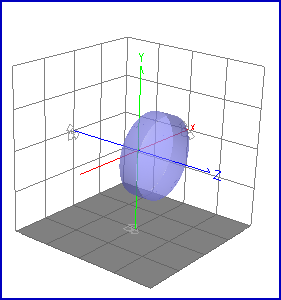
The image below shows the 3D View of a lens with the Background Grid enabled.
Related Topics
Show: ... in new systems
Preferences
|
Copyright © Photon Engineering, LLC
|
|