|
Description
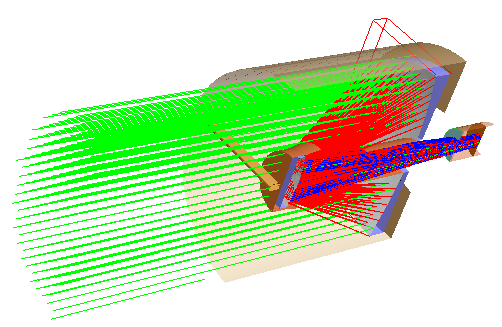
The Cutaway Clipping feature allows for specification of cutaway viewing in the 3D View. The user selects a combination of the X, Y and Z axes as well as the clipping plane depth and direction. This feature is for visualization purposes only and will not affect the geometry or accuracy of the model.
The Cutaway Clipping feature is used in conjunction with Toggle Cutaway Clipping, which allows cutaway clipping to be rapidly toggled on or off.
Navigation
This feature can be accessed in the following ways:
•Menu > 3D View > Cutaway Clipping Properties
Controls
|
Control
|
Inputs / Description
|
Defaults
|
|
Enable cutaway clipping in visualization view
|
Enable cutaway feature.
|
Unchecked
|
|
Along X(YZ) Axis
|
|
Enable this clipping plane
|
Enable X (YZ plane), Y (XZ plane), or Z (XY plane) clipping.
|
Unchecked
|
|
Clip positive side
|
Select which side of plane geometry is to be removed.
|
Unchecked
|
|
Plane Depth Along Axis
|
Adjust position of plane along axis normal.
|
0
|
|
|
|
Update clipping in view dynamically
|
3D View is updated immediately after plane depth adjustment.
|
Unchecked
|
|
|
|
OK
|
Accept settings and close dialog box.
|
|
|
Cancel
|
Discard changes and close dialog box.
|
|
|
Apply
|
Accept changes and keep dialog box open.
|
|
|
Help
|
Access this Help page.
|
|
Example
The following image shows the 3D View of a Cassegrain telescope system with cutaway clipping enabled.
Related Topics
Toggle Cutaway Clipping
|
Copyright © Photon Engineering, LLC
|
|