Description Gets a NURB surface from the associated FRED document.
Syntax GetNURBSurf n, entity, maxIdxU, maxIdxV, orderU, orderV, knotU, knotV, points, weights
Parameters n As Long Node number of the surface.
entity As T_ENTITY Will hold the generic entity data from the NURB surface.
maxIdxU As Long One less than the number of terms in the U parameter direction.
maxIdxV As Long One less than the number of terms in the V parameter direction.
orderU As Long Returns the order of the U basis functions.
orderV As Long Returns the order of the V basis functions.
knotU() As Double Returns the values in the U knot array.
knotV() As Double Returns the values in the V knot array.
points() As Double Returns the control points as a 2 x N array, where N is the number of control points minus 1.
weights() As Double Returns the weights of the control points.
Remarks If there is a problem, the subroutine sets an error and returns without modifying the parameters. Note that the NURB order is given by order = degree + 1. For example, an order 3 NURB is quadratic and an order 4 NURB is cubic.
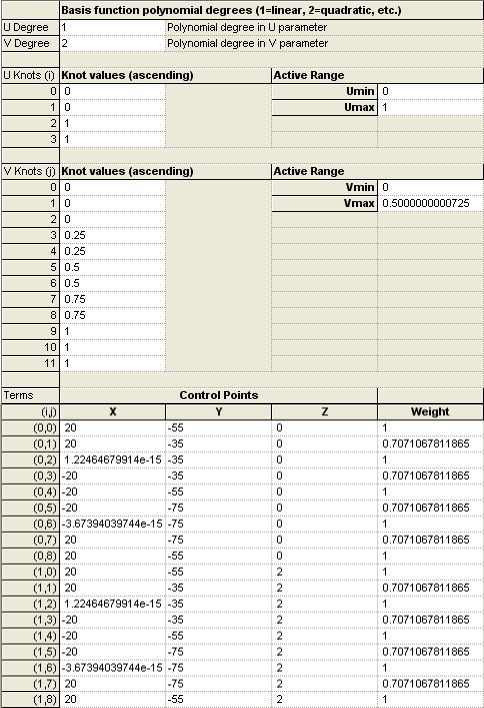
Example Suppose that a NURB surface is defined with the parameters shown below:
The following script uses the GetNURBSurf subroutine to retrieve the surface's information and print it to the output window. Sub Main
Dim ent As T_ENTITY Dim nurbNode As Long, maxIdxU As Long, maxIdxV As Long, orderU As Long, orderV As Long, ii As Long, jj As Long Dim knotU() As Double, knotV() As Double, points() As Double, weights() As Double
ClearOutputWindow
'Node number of the NURB surface being queried nurbNode = FindFullName( "Geometry.cadgasket.Trimmed Surface 611 87.B-Spline Surface 88" )
'Retrieve the parameters of the NURB surface GetNURBSurf nurbNode, ent, maxIdxU, maxIdxV, orderU, orderV, knotU, knotV, points, weights
'Print out NURB surface information Print "Node Number: " & Chr(9) & nurbNode Print "Name: " & Chr(9) & ent.name Print "Max U Index: " & Chr(9) & maxIdxU Print "Max V Index: " & Chr(9) & maxIdxV Print "Order U: " & Chr(9) & orderU Print "Order V: " & Chr(9) & orderV
'Print out U and V knot vectors in columns. Print "Knot Vectors: " & Chr(9) & "U Knot" & Chr(9) & "V Knot" For ii = 0 To Max( UBound( knotU, 1 ), UBound( knotV, 1 ) ) If ii <= UBound( knotU, 1 ) Then Print Chr(9) & knotU( ii ); Else Print Chr(9) & Chr(9); End If If ii <= UBound( knotV, 1 ) Then Print knotV( ii ) Else Print Chr(9) End If Next ii
'Print out control points and weights arrays. There are (maxIdxU+1)*(maxIdxV+1) control points. 'In this case the points() array has size 2 x 17. Print "Control points and weights: Print Chr(9) & "X" & Chr(9) & "Y" & Chr(9) & "Z" & Chr(9) & "Weight" For ii = 0 To (maxIdxU+1)*(maxIdxV+1)-1 Print Chr(9) & points( 0, ii ); Print points( 1, ii ); Print points( 2, ii ); Print weights( ii ) Next ii
End Sub
This script prints the following information to the output window for the example NURB surface: Node Number: 6 Name: B-Spline Surface 88 Max U Index: 1 Max V Index: 8 Order U: 2 Order V: 3 Knot Vectors: U Knot V Knot 0 0 0 0 1 0 1 0.25 0.25 0.5 0.5 0.75 0.75 1 1 1 Control points and weights: X Y Z Weight 20 -55 0 1 20 -35 0 0.7071067811865 1.224646799147E-15 -35 0 1 -20 -35 0 0.7071067811865 -20 -55 0 1 -20 -75 0 0.7071067811865 -3.673940397442E-15 -75 0 1 20 -75 0 0.7071067811865 20 -55 0 1 20 -55 2 1 20 -35 2 0.7071067811865 1.224646799147E-15 -35 2 1 -20 -35 2 0.7071067811865 -20 -55 2 1 -20 -75 2 0.7071067811865 -3.673940397442E-15 -75 2 1 20 -75 2 0.7071067811865 20 -55 2 1
See Also
|