Description Calculates the intensity (radiometric or photometric) at user specified directions provided a ray filter set and an acceptance cone size. Depending on the number of rays traced, it may be necessary to dimension ray index and ray counter variables as data type Huge_ instead of Long. Please see Multi-threaded Raytracing for more information.
Syntax numRays = IntensityAtSpecifiedDirections( filterSpec, coordSys, directions(), coneHalfAngle, conversion, intAtDirs() )
Parameters numRays (Long or Huge_) Number of rays included in the analysis results.
filterSpec As Long The filter specification can be entered in the following ways: -1 = Use all rays Source or Surface node number = Use rays on the specified source or surface Analysis surface node = Apply ray filter set from the specified analysis surface
coordSys As Long Coordinate system in which the results are expressed.
directions() As Double Two dimensional array containing the x,y and z direction cosines for each direction of interest. For example, if two directions are to be queried the dimension statement and assignment would be:
Dim directions(1,2) As Double directions(0,0) = x0 : directions(0,1) = y0 : directions(0,2) = z0 directions(1,0) = x1 : directions(1,1) = y1 : directions(1,2) = z1
coneHalfAngle As Double Half angle specification for the acceptance cone about the direction of interest in which rays will be included.
conversion As Boolean True = calculate luminous intensity (photometric) False = calculate intensity (radiometric)
intAtDirs() As Double Array containing the calculated intensity values at each of the specified directions.
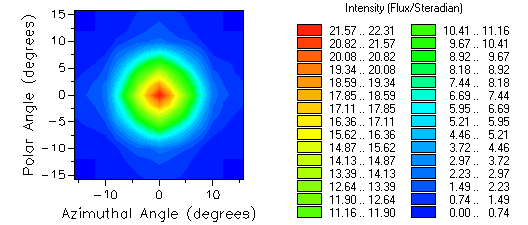
Example The following example compares the results from an Intensity on Polar Grid analysis with an application of the IntensityAtSpecifiedDirections script command. The Intensity on Polar Grid analysis produces the following results:
The following code calculates the radiometric intensity along the z-axis and at 6 degrees from the z-axis in the y-z plane.
Sub Main
Dim daeNode As Long Dim directions(1,2) As Double, intAtDirs() As Double Dim coneHalfAngle As Double Dim conversion As Boolean
ClearOutputWindow
'analysis surface used for ray filtering daeNode = FindFullName( "Analysis Surface(s).Analysis 1" )
'0 degrees from z-axis directions(0,0) = 0 directions(0,1) = 0 directions(0,2) = 1
'6 degrees from z-axis directions(1,0) = 0 directions(1,1) = 0.1045284633 directions(1,2) = 0.99452189
'1 degree half-cone averaging and no photometric conversion coneHalfAngle = 1 conversion = False
numRays = IntensityAtSpecifiedDirections( daeNode, -1, directions( ), coneHalfAngle, conversion, intAtDirs() )
'print results to output window Print "Number of rays included: " & numRays For ii = 0 To UBound( intAtDirs, 1) Print "Direction " & ii+1 & ": " & intAtDirs( ii ) Next ii
End Sub
This code prints the following to the output window:
Number of rays included: 3079 Direction 1: 21.913151791925 Direction 2: 10.2616666951216
See Also
|